
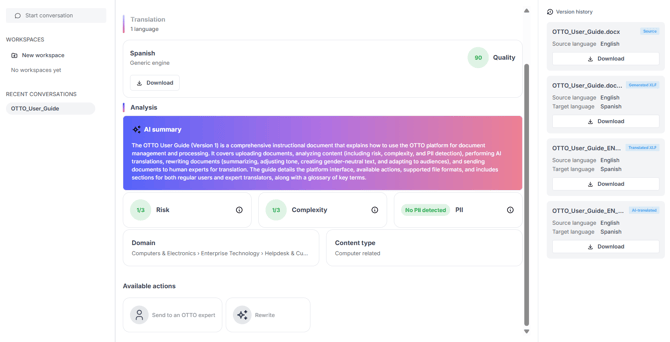
Click Start analysis on your document. OTTO then produces several insights.
| Item | Description |
|---|---|
| AI summary | An automatic summary of the document |
| Risk | The risk level of the content, shown as a level (e.g. 1/3) |
| Complexity | The complexity level, shown as a level (e.g. 2/3) |
| PII | Detection of personal information — e.g. "No PII detected" |
| Domain | The detected subject area, shown as a path (e.g. Computers & Electronics › Software › Intelligent Personal Assistants) |
Click a score, badge, or the info (i) icon to see a more detailed explanation.
A document can be analyzed only once. If you need to work with it further, use translation or rewriting instead.